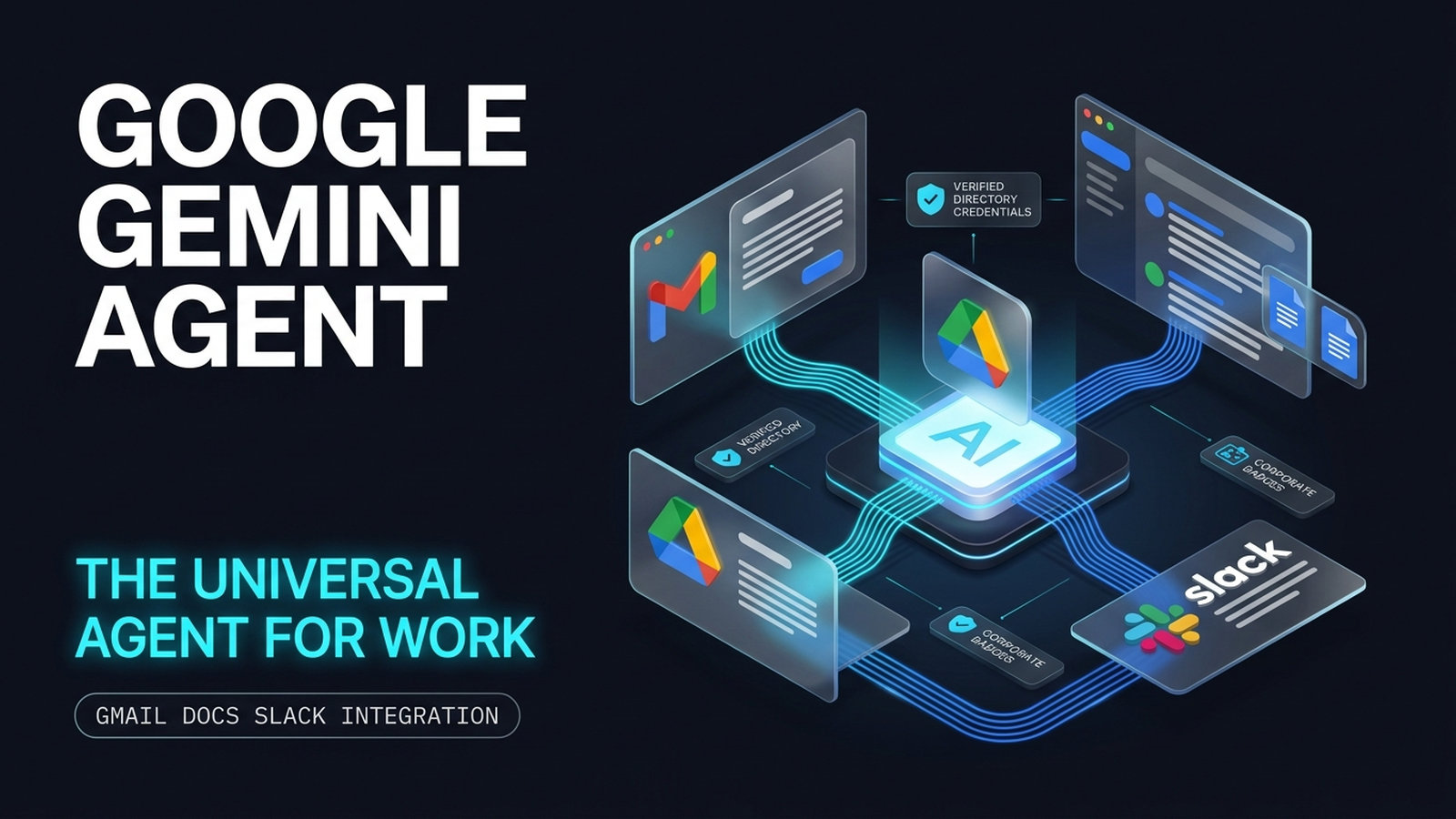
The Google Gemini Agent is an autonomous enterprise AI system designed to act as a digital coworker. Operating across Google Workspace and Slack, it turns high-level business goals into finished deliverables without step-by-step human prompting. Announced at Google Cloud Next, this new architecture moves beyond reactive chat windows by giving software its own corporate directory identity, persistent multi-tier memory, and cross-application execution authority.
What if your most reliable new team member did not sit at a desk, but instead arrived with an active company email address, a dedicated calendar, and the ability to coordinate entire client projects while you slept?
If you have spent the last two years copying and pasting prompts between conversational AI tools, scattered spreadsheet tabs, and crowded Slack threads, you already know the dirty secret of modern workplace AI: prompt fatigue is real. Conversational chatbots are powerful, but they remain passive. They wait for instructions, forget context the moment a browser tab closes, and cannot touch your actual tools.
The Google Gemini Agent represents a fundamental shift from reactive text generation to delegated, autonomous execution. In this guide, we examine the underlying architecture of Google's universal agent, walk through how it operates across your day-to-day workflow, confront the critical quantitative risks every business operator must manage, and provide an objective framework for calculating whether AI agent seats justify their monthly software cost.
Key Takeaways
Delegation Over Prompting: The Google Gemini Agent operates on high-level business objectives rather than micro-prompts, functioning as a digital coworker with its own directory seat (
@agents.yourcompany.com), email inbox, and calendar.Cross-Platform Native Execution: Native deep links allow the agent to triage inbound client threads in Gmail, assemble research syntheses in Google Docs, query company drives, and post project updates directly into Slack channels.
Four-Tier Memory Architecture: The agent maintains continuity across projects through distinct Session, Semantic, Procedural, and Episodic memory layers, eliminating repetitive context setup.
The Quantitative Math Hazard: Generative AI agents frequently hallucinate financial calculations, unit economics, and tax logic. Safe implementation requires a "Two-Speed AI Stack" that routes quantitative modeling to deterministic, benchmarked business tools.
Hard ROI Math: At $21 to $30 per seat per month plus consumption tokens, an agent seat must reliably save at least 0.93 to 2.5 billable hours per user each month to produce a net positive return on investment.
What Is the Google Gemini Agent? (The 'Universal Agent for Work' Defined)
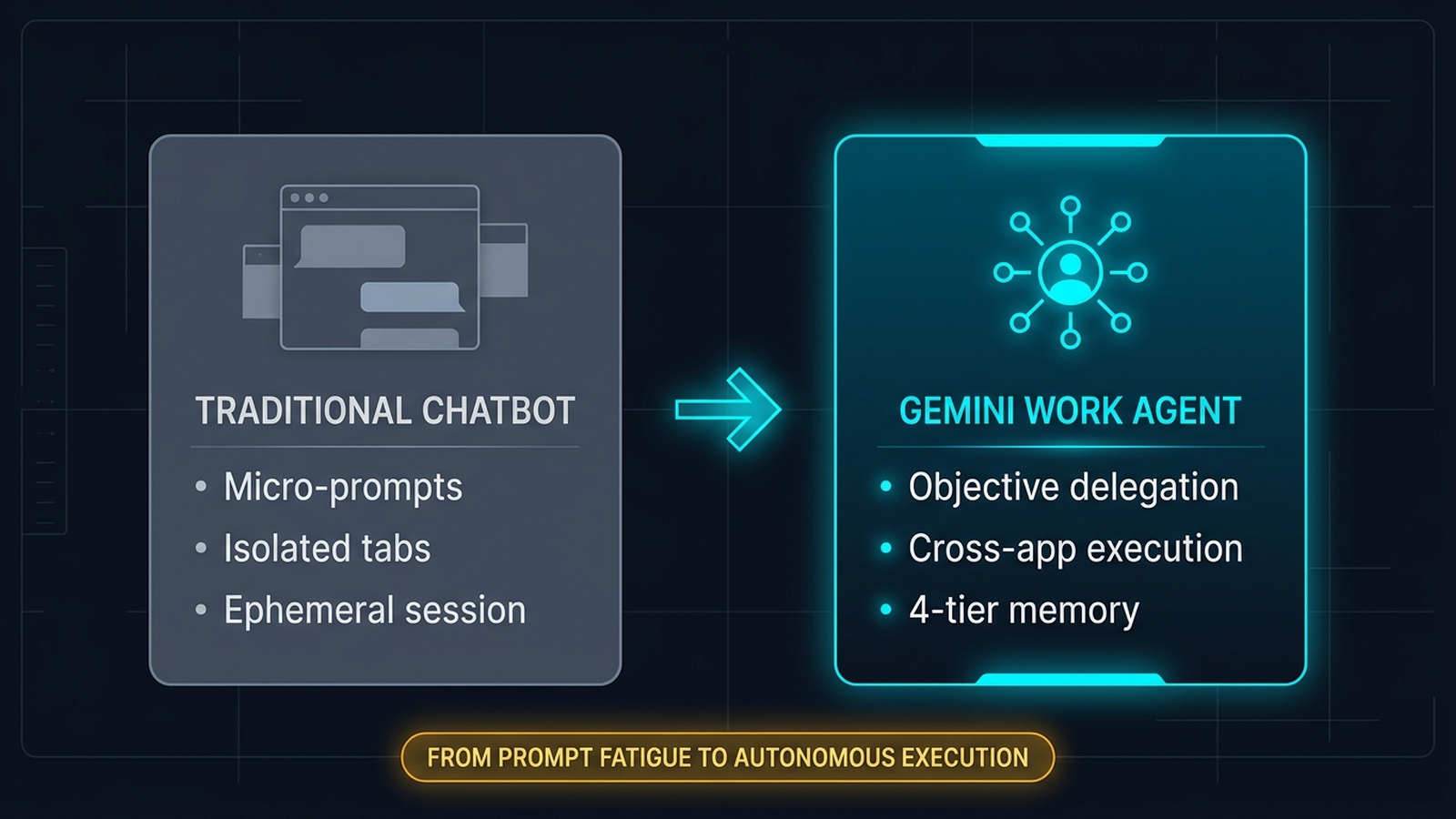
The Google Gemini Agent is an autonomous 'universal agent for work' designed to execute multi-step objectives across Google Workspace (Gmail, Docs, Sheets, Drive) and third-party tools like Slack. Unlike standard chat assistants that require step-by-step prompts, it functions as an identifiable digital coworker with its own email address, calendar, persistent memory, and sub-agent orchestration.
According to the official Google Cloud announcement, enterprise software is transitioning from reactive tools to agentic systems. Rather than asking an AI to "draft a polite reply to this client email," an operator gives the Google Gemini Agent an outcome-oriented objective: "Prepare the Q4 onboarding package for Acme Corp, schedule the kickoff meeting around the client's eastern time zone, assemble the scope brief in Docs using our standard retainer template, and notify the account lead in Slack once the files are ready for review."
+--------------------------------------------------------------------------+
| THE PARADIGM SHIFT IN WORKPLACE AI                                       |
+--------------------------------------------------------------------------+

 TRADITIONAL CHATBOT (Step-by-Step Prompting)
 [User Prompt 1] -+--------------------------------------------------------------------------+
| THE PARADIGM SHIFT IN WORKPLACE AI                                       |
+--------------------------------------------------------------------------+

 TRADITIONAL CHATBOT (Step-by-Step Prompting)
 [User Prompt 1] ---> [Draft Text] - [Draft Text] ---> [Copy/Paste into Doc]
 [User Prompt 2] - [Copy/Paste into Doc]
 [User Prompt 2] ---> [Summarize Email] - [Summarize Email] ---> [Manual Calendar Invite]
 [User Prompt 3] - [Manual Calendar Invite]
 [User Prompt 3] ---> [Write Slack Update] - [Write Slack Update] ---> [Manual Channel Post]

 GOOGLE GEMINI AGENT (Objective Delegation)
 [Single Objective]
        |
        v
 +------------------------------------------------------------------------+
 | Gemini Agent Orchestration Engine                                      |
 | * Autonomous Task Decomposition                                        |
 | * Gmail Thread Analysis                                                |
 | * Docs Assembly & Drive Synthesis                                      |
 | * Slack Channel Notification & Handoff                                 |
 +------------------------------------------------------------------------+
To understand where this new architecture fits in your software stack, it helps to compare the three generations of workplace tools:
Feature & Operational Capability | Traditional Chatbots (e.g., Free Web Chat) | Google Gemini Agent (Enterprise Workspace) | Deterministic Business Tools (e.g., ToolsToFind) |
|---|---|---|---|
Operating Model | Reactive text generation based on prompt inputs | Autonomous goal execution across integrated business tools | Formulaic, deterministic calculation and structured data |
System Access | Isolated sandbox; no access to company files | Native read/write access to Gmail, Docs, Drive, and Slack | Secure user inputs with persistent database record |
Digital Identity | Anonymous browser session | Dedicated corporate email ( | Authenticated user account and dashboard |
Memory Retention | Ephemeral; clears on session reset | 4-tier persistent memory (Session, Semantic, Procedural, Episodic) | Saved scenario history and persistent project outputs |
Math & Calculation Reliability | High hallucination risk on multi-step financial math | Moderate-to-high hallucination risk on quantitative logic | 100% deterministic accuracy backed by tax tables & benchmarks |
Primary Business Role | One-off copywriting, brainstorming, and translation | Cross-app workflow synthesis, triage, and task coordination | Margin analysis, payroll modeling, cash flow planning, and ROI |
How the Google Gemini Agent Operates Across Gmail, Docs, and Slack
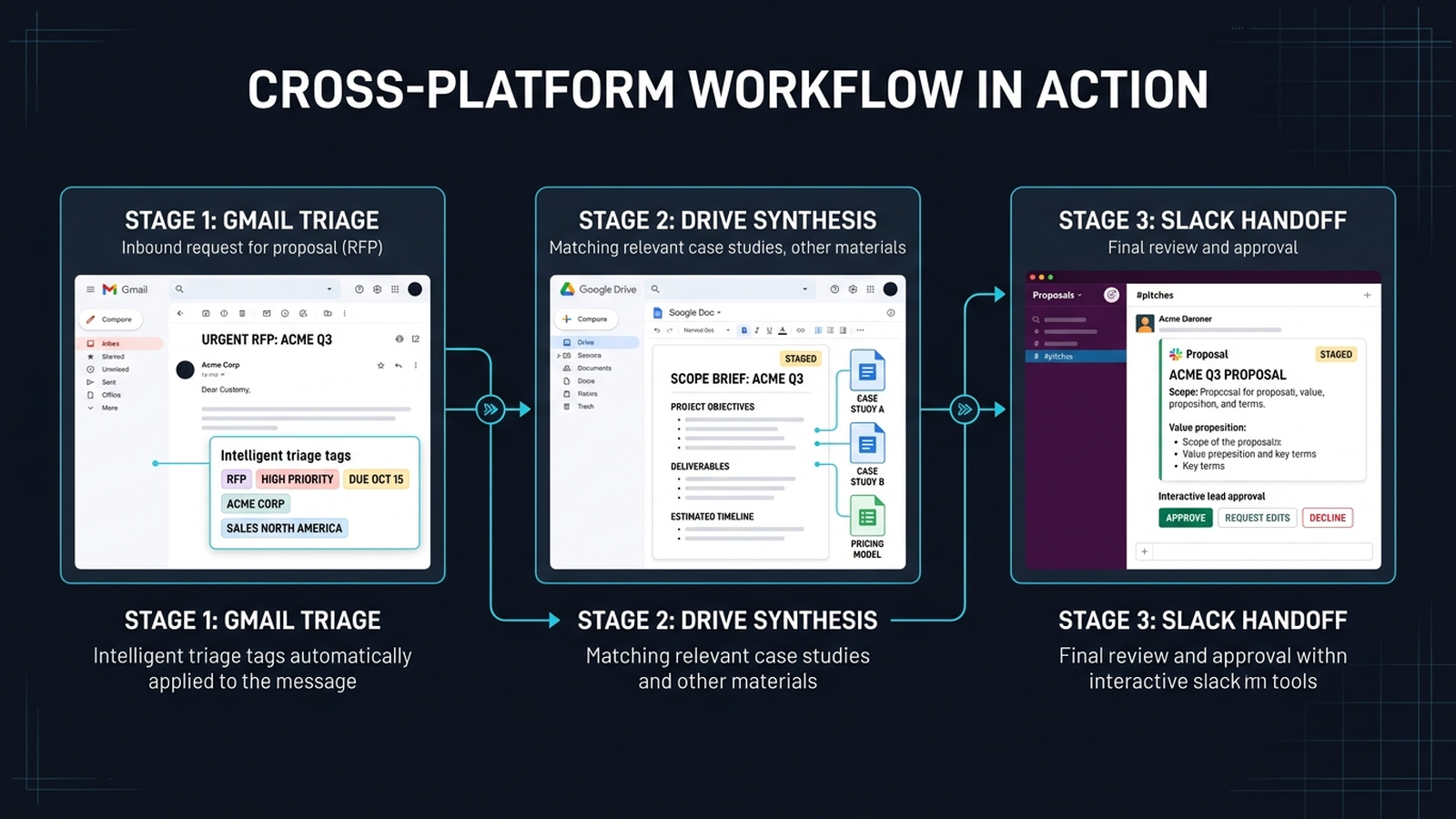
The core breakthrough of the gemini universal agent for work is not raw language capability. It is context continuity across the tools where teams actually spend their working hours.
Review the Google Gemini Agent Demonstration and Workspace Overview to see how autonomous agentic workflows coordinate multi-step tasks across enterprise productivity tools.
Autonomous Email Triage and Client Operations in Gmail
In modern knowledge work, email is rarely a series of isolated messages. It is an unorganized log of project changes, scope requests, invoice questions, and scheduling conflicts. The Google Gemini Agent approaches Gmail as a persistent communication pipeline rather than an inbox.
When a multi-stakeholder email thread arrives regarding a project delay, the agent does not merely summarize the latest reply. It cross-references previous email exchanges from the client over the past six months, locates the original signed scope document in Google Drive, identifies the conflicting calendar obligations of your team members, and stages a contextual draft reply. Crucially, the agent can hold drafts in a pending queue until designated team leads click to approve, preventing rogue communication while eliminating manual inbox sifting.
Document Assembly and Knowledge Synthesis in Google Docs and Drive
Creating first drafts of client deliverables, proposals, and internal post-mortems usually requires hunting through half a dozen folders to find past examples. By deploying the gemini agent in gmail docs slack, teams can operate directly within their shared Google Drive file hierarchy through the Google Workspace platform.
You can trigger the agent from within a blank Google Doc using inline @Gemini commands to assemble complex briefings. For instance, an operator can command the agent to read three recorded meeting transcripts in Drive, compare them against a client's brand guidelines PDF, and generate an eight-page project onboarding brief formatted to your agency's standard styling. Because the agent reads native Workspace structures, it formats headings, builds comparison tables, and inserts reference links to source files automatically.
Channel Collaboration and Action Dispatching Inside Slack
Work does not stop inside Google's proprietary ecosystem. Through enterprise Slack integrations, the Google Gemini Agent functions as an interactive team member inside project channels.
+--------------------------------------------------------------------------+
| CROSS-PLATFORM CLIENT WORKFLOW IN ACTION                                 |
+--------------------------------------------------------------------------+

 1. GMAIL                   2. GOOGLE DRIVE            3. SLACK
 Inbound RFP received       Agent locates historical   Agent posts scope draft
 from prospective client    pricing sheets & case      in #client-pitches with
 in agency inbox            studies in shared drive    direct approval links
        |                          |                          |
        +--------------------------+--------------------------+
                                   |
                                   v
 [Inbox Monitoring] ------+--------------------------------------------------------------------------+
| CROSS-PLATFORM CLIENT WORKFLOW IN ACTION                                 |
+--------------------------------------------------------------------------+

 1. GMAIL                   2. GOOGLE DRIVE            3. SLACK
 Inbound RFP received       Agent locates historical   Agent posts scope draft
 from prospective client    pricing sheets & case      in #client-pitches with
 in agency inbox            studies in shared drive    direct approval links
        |                          |                          |
        +--------------------------+--------------------------+
                                   |
                                   v
 [Inbox Monitoring] --------> [Folder Synthesis] ------ [Folder Synthesis] --------> [Channel Handoff]
Instead of forcing your staff to navigate into Workspace administrative consoles, team members can mention @Gemini in Slack channels to query project states, trigger file syntheses, or request status updates:
"@Gemini, what are the three unresolved action items from the Acme Corp sync yesterday, and who owns them?"
"@Gemini, assemble a bullet summary of the client feedback submitted to support this morning and drop it into Docs."
"@Gemini, ping the delivery team in Slack when the client approves the proposal draft."
Mini-Story: How Marcus Reclaimed Twelve Hours on Agency Pitches
Marcus runs an eight-person digital strategy agency in Chicago. Every week, his firm responds to two or three detailed Requests for Proposals (RFPs). Historically, each proposal required Marcus to spend four hours combing through past pitch decks in Drive, cross-referencing team availability in Google Calendar, and checking email threads for specific client constraints.
Last month, Marcus configured the Google Gemini Agent across his Workspace and Slack workspace. When an enterprise retail lead submitted a 40-page RFP via email, Marcus assigned the objective to the agent: extract client deliverables, match them against past agency case studies in Drive, and stage a customized proposal draft in Docs.
Within twenty-five minutes, the agent assembled a 3,000-word draft proposal and posted a summary into the agency's #pitches Slack channel. Marcus spent forty-five minutes refining the strategic narrative rather than four hours hunting through folders. However, when Marcus reviewed the pricing section, he noticed the agent had averaged historical hourly rates across three unrelated sectors, inventing an unworkable project margin. Marcus used the narrative, but recalculated the pricing using verified financial models, a distinction that saved the firm from an expensive bidding error.
Need to pressure-test your team's tech stack budget? Model software payback, subscription economics, and team capacity with our free SaaS ROI calculator before signing annual enterprise AI contracts.
Inside the Coworker Architecture: Digital Identity, 4-Tier Memory, and Sub-Agents
Why does Google brand this technology as a "coworker" rather than an updated Workspace sidebar? The answer lies in three architectural systems: dedicated digital identity, multi-tier memory, and dynamic sub-agent orchestration.
+--------------------------------------------------------------------------+
| FOUR-TIER PERSISTENT MEMORY ARCHITECTURE                                 |
+--------------------------------------------------------------------------+

 SESSION MEMORY       Semantic state of the immediate conversation
                      (Variables, current thread, active user prompt)
       |
       v
 SEMANTIC MEMORY      Permanent company knowledge base
                      (Product catalogs, brand guides, pricing rules)
       |
       v
 PROCEDURAL MEMORY   Organizational workflows and execution protocols
                      (Standard Operating Procedures, escalation rules)
       |
       v
 EPISODIC MEMORY      Historical record of past decisions and outcomes
                      ("Client rejected 30-day terms on project Delta")
1. Dedicated Corporate Digital Identity
Traditional AI tools act as plugins attached to individual user logins. The google gemini coworker agent receives an autonomous identity in your corporate identity directory (Google Cloud Identity and Google Workspace Admin).
The agent can be assigned an email address such as gemini-ops@agents.yourcompany.com, an individual calendar, and explicit file-sharing permissions. This architecture provides three concrete operational benefits:
Auditability: Every document edit, outbound email draft, and file access event is logged under the agent's specific identity rather than masking under an employee's personal account.
Access Control: System administrators can grant the agent read-only access to specific client directories while strictly barring it from human resources, executive compensation, or proprietary financial records.
Handoff Ease: When a project manager takes parental leave or departs the company, project context remains intact with the agent rather than being locked inside an individual's personal chat history.
2. The Four-Tier Memory Engine
The primary reason legacy AI assistants fail at complex workflows is context amnesia. The Google Gemini Agent resolves this with an enterprise memory engine divided into four distinct operational tiers:
Session Memory: Retains the transient, real-time context of the current conversation or task execution loop. Once the objective concludes, this layer flushes to save token overhead.
Semantic Memory: The structured index of your company's institutional knowledge base. It ingests your company handbooks, service documentation, glossary terms, and client rosters, ensuring corporate terminology is applied accurately.
Procedural Memory: Stores your team's Standard Operating Procedures (SOPs). It preserves how your company executes work, such as the exact seven steps required to onboard a retainer client or the standard review hierarchy for outbound creative assets.
Episodic Memory: Records past outcomes, project decisions, and contextual preferences over time. If a client explicitly stated in June that they despise bulleted executive summaries, the agent retains that preference in episodic memory and formats future deliverables in narrative prose.
3. Dynamic Sub-Agent Orchestration
Complex business objectives are rarely solvable by a single prompt. When the Google Gemini Agent receives a broad directive, it acts as a primary orchestrator that spawns temporary, specialized sub-agents to complete component tasks in parallel.
For example, if tasked with auditing competitor pricing across five target markets, the primary agent decomposes the job. It spawns three lightweight research sub-agents to extract data from public documentation, directs an analysis sub-agent to format the data into structured tables, and uses a synthesis sub-agent to compile the final report in Docs. Once the sub-agents finish their tasks, the orchestrator consolidates the output, shuts down the sub-agents to conserve computational resources, and delivers the finished document to your team.
Enterprise Governance, Multi-Model Routing, and Pricing
Deploying autonomous agents across corporate data requires rigorous technical guardrails and clear budgetary forecasting.
+--------------------------------------------------------------------------+
| AGENT GATEWAY SECURITY AND MULTI-MODEL ROUTING                           |
+--------------------------------------------------------------------------+

 [ Incoming Objective Delegation ]
                |
                v
 +------------------------------------------------------------------------+
 | AGENT GATEWAY                                                          |
 | * DLP Inspection                                                       |
 | * Cryptographic Authentication                                         |
 | * Action Rate Limits & Approval Checkpoints                            |
 +------------------------------------------------------------------------+
                |
                +---------------------------------------+
                |                                       |
                v                                       v
 [ Simple Task / Triage ]                [ Deep Reasoning / Code Synthesis ]
                |                                       |
                v                                       v
 Gemini Flash Tier                       Anthropic Claude / Gemini Pro Tier
 (Low cost, high throughput)             (High reasoning depth)
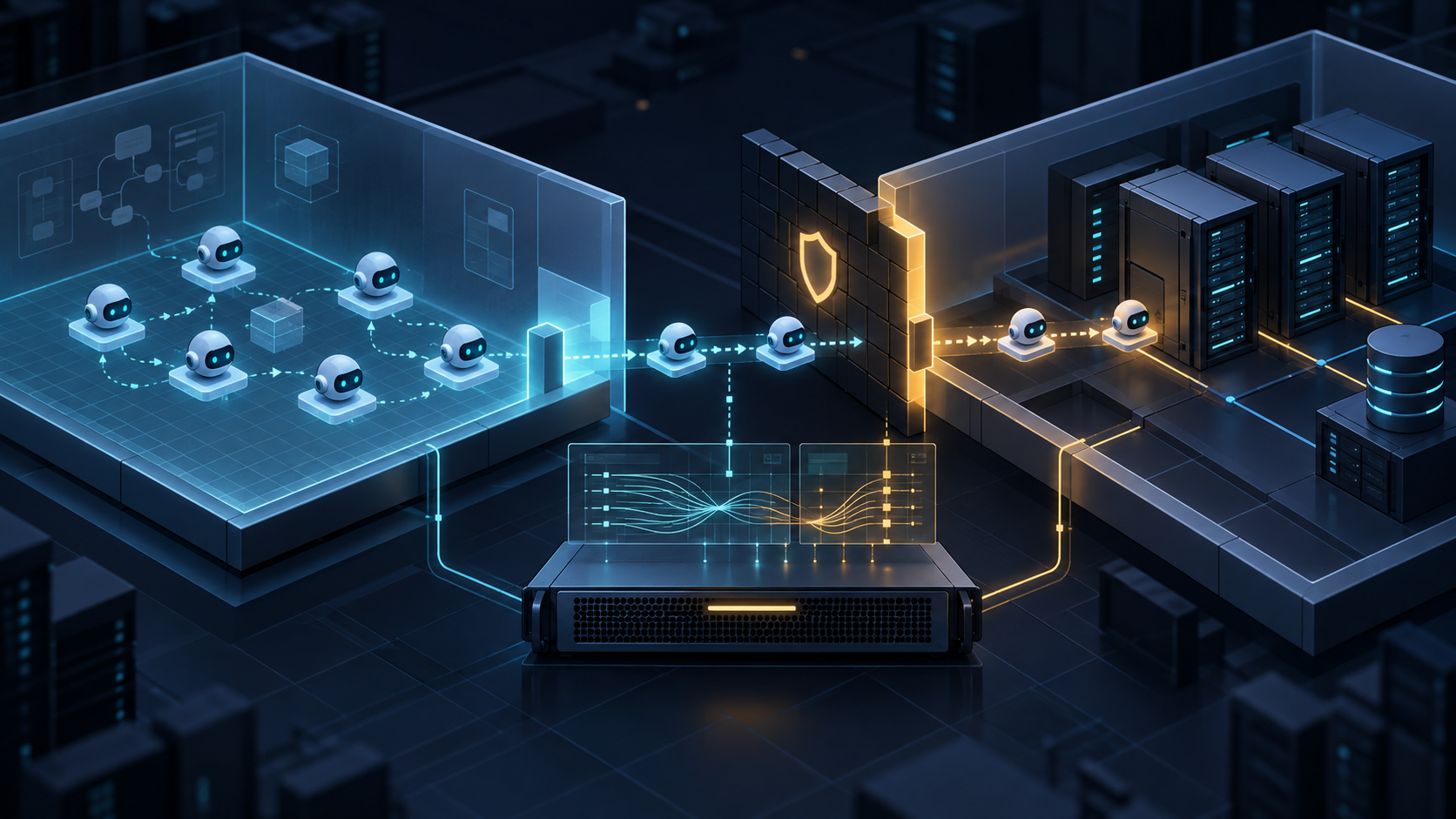
The Agent Gateway: Enterprise Firewalls and Action Approvals
Letting software write emails and modify files introduces substantial organizational risk without clear administrative controls. Google addresses this through the Agent Gateway, an administrative management layer that enforces security policies. As highlighted in enterprise analyses by Constellation Research, governance architecture is the single most critical factor separating pilot toys from production-grade agent deployments:
Data Loss Prevention (DLP): Filters scan all agent inputs and outputs, blocking the transmission of personally identifiable information (PII), payment card numbers, or proprietary source code to unauthorized endpoints.
Cryptographic Action Signing: Every autonomous action, such as updating a spreadsheet cell or staging a calendar event, is cryptographically signed with the agent's identity, providing an immutable audit trail in Google Cloud Logging.
Human-in-the-Loop Thresholds: Administrators configure specific trigger events that require human sign-off. While the agent can autonomously organize research notes, actions like sending an external email or altering shared folder permissions pause until an authorized manager approves the prompt.
Multi-Model Smart Routing in Practice
Not every task requires the massive reasoning power and expense of an ultra-large frontier model. The Google Gemini Agent uses smart routing to dynamically distribute tasks across model tiers based on computational complexity.
For routine tasks like scanning inboxes or categorizing Slack tickets, the agent selects Gemini Flash. This smart routing minimizes latency and protects your monthly budget.
When faced with parsing dense technical briefs or writing multi-file application scripts, the router escalates the objective to Gemini Pro or external partner models like Anthropic Claude. This multi-model approach balances response speed with deep reasoning while containing consumption expenses.
Gemini Enterprise Agent Pricing and Total Cost of Ownership
Evaluating gemini enterprise agent pricing requires analyzing both seat licenses and computational usage fees. As tracked in VentureBeat's enterprise AI reporting, organizations frequently underestimate token consumption overhead when moving autonomous agent pilots into production:
Gemini Business Tier: Approximately $21 per user per month (billed annually). Includes basic agent features inside standard Google Workspace applications with foundational rate limits on autonomous actions.
Gemini Enterprise Tier: Approximately $30 per user per month (billed annually). Unlocks unrestricted cross-app agent orchestration, full Slack workspace integration, dedicated Agent Gateway security policies, and custom procedural memory storage.
Token Consumption Surcharges: While baseline interactions fall within seat allowances, heavy autonomous sub-agent orchestration (such as running multi-hour background research across thousands of Drive files) consumes background tokens billed against your Google Cloud project.
For an agency with fifteen knowledge workers on the Enterprise tier, the baseline software commitment runs $450 per month, with real-world token usage often pushing the total commitment to $550-$650 per month.
The Operator's Reality Check: Why the Google Gemini Agent Stumbles on Business Math
While the Google Gemini Agent excels at synthesizing human language and organizing project logistics, deploying it for quantitative business modeling presents severe risks.
The Problem of Probabilistic Language Models in Deterministic Math
Large Language Models (LLMs) operate on statistical probability. They predict the next most logical word or token in a sequence based on vast training datasets. They do not calculate numbers using deterministic, audited arithmetic engines.
When an operator asks a generative agent to calculate project gross margins, forecast monthly payroll withholdings, or determine break-even revenue lines, the agent frequently produces output that looks mathematically sound while being fundamentally incorrect. It generates numbers that fit the grammatical cadence of an accounting report, but the arithmetic falls apart under scrutiny.
+--------------------------------------------------------------------------+
| THE FINANCIAL DRIFT HAZARD IN GENERATIVE AI                              |
+--------------------------------------------------------------------------+

 OPERATOR REQUEST: "Calculate net margin on our $10,000 service retainer
 with $6,200 direct labor and 15% overhead."

 GENERATIVE AGENT OUTPUT (Probabilistic Guesswork):
 "Your net profit is $2,800, yielding a healthy 28% margin!"
 [CRITICAL ERROR: Ignored the $1,500 overhead allocation entirely;
 actual net profit is $2,300 with a 23% margin. A 5% blind spot.]

 DETERMINISTIC CALCULATOR OUTPUT (Formulaic Verification):
 Gross Revenue: $10,000
 Direct Costs: -$6,200 (Gross Profit: $3,800 | Gross Margin: 38.0%)
 Overhead (15%): -$1,500
 Net Profit: $2,300 (Net Margin: 23.0% | Variance: -$500)
Common mathematical errors produced by generative agents include:
Confusing Markup with Gross Margin: Generative models routinely treat a 50% markup as a 50% profit margin, hiding massive pricing shortfalls. (A $100 cost marked up 50% sells for $150, which yields a 33.3% gross margin, not 50%).
Ignoring Payroll Tax Compounding: When asked to estimate the loaded cost of a new hire, agents frequently multiply base salary by an arbitrary percentage, skipping state-specific employer FICA caps, unemployment insurance rate brackets, and workers' compensation adjustments.
Token Runaway and Cost Drift: If an agent enters a self-reflective reasoning loop while attempting to reconcile an unformatted financial spreadsheet, it can burn through hundreds of thousands of background tokens in minutes, incurring unexpected API expenses without delivering a verifiable answer.
Mini-Story: Sarah's Near-Miss on a $140,000 Consulting Bid
Sarah is the managing partner of an environmental engineering consultancy in Denver. Her firm was bidding on a comprehensive $140,000 state compliance contract involving six specialized subcontractors over an eight-month delivery timeline.
Under pressure to deliver the proposal before a 5:00 PM deadline, Sarah instructed an enterprise generative agent to evaluate the project's contribution margin and calculate the team's break-even billing rate based on a spreadsheet of historical subcontractor hours stored in Drive. The agent analyzed the spreadsheet, drafted an impressive narrative proposal, and reported a projected gross margin of 34%, comfortably above the firm's mandatory 28% threshold.
Trusting her instincts, Sarah paused. Before submitting the proposal, she spent ten minutes inputting the direct labor costs, subcontractor fees, and equipment rentals into a dedicated profit margin calculator.
The reality was startling: the generative agent had conflated blended hourly billing rates with loaded internal pay rates, while entirely dropping an 8.5% equipment allocation fee. The true gross margin on the contract was just 14%. Had Sarah submitted the proposal based on the agent's generative math, the firm would have absorbed a $28,000 margin deficit over the life of the project.
Don't let generative AI guess your unit economics. Verify your client pricing, hourly billable rates, and project overhead using our benchmark-backed profit margin calculator and our practical guide to break-even analysis for service businesses.
The Two-Speed AI Stack: Pairing Autonomous Agents with Deterministic Tools
High-performing businesses do not choose between autonomous AI agents and verified calculators. They build a Two-Speed AI Stack that assigns operational tasks to the engine best equipped to handle them without error.
+--------------------------------------------------------------------------+
| THE TWO-SPEED AI STACK FRAMEWORK                                         |
+--------------------------------------------------------------------------+

 SPEED 1: GENERATIVE AGENTS (Gemini Agent in Workspace & Slack)
 Role: Narrative, Logistics, Synthesis, Communication
 * Inbound email triage and calendar coordination
 * Cross-referencing Drive transcripts and meeting notes
 * Drafting proposal outlines and onboarding documentation
 * Summarizing Slack status inquiries and team updates
       |
       | Hand off structured quantitative requirements
       v
 SPEED 2: DETERMINISTIC TOOLS (ToolsToFind Verified Engines)
 Role: Verified Financial Calculations, Benchmarks, Cash Math
 * Unit economics and gross vs. net margin verification
 * Delivery cost modeling and margin breakdowns
 * Capital equipment ROI, NPV, and payback horizon modeling
 * Client-ready, watermark-free financial exhibits and exports
Speed 1: Generative Agents for Narrative, Synthesis, and Logistics
The Google Gemini Agent handles unstructured, narrative-heavy tasks where flexibility and contextual awareness matter most:
Monitoring Gmail threads to detect scope creep or schedule changes.
Synthesizing meeting recordings into structured action items inside Google Docs.
Pulling case studies and client references from shared Google Drive folders.
Drafting initial proposal frameworks, email check-ins, and team Slack briefings.
Speed 2: Deterministic Tools for Financial Precision and Compliance
When numbers touch real currency, client invoices, bank financing, or employee paychecks, work routes to dedicated calculation engines that eliminate probabilistic hallucination:
Profit Margins & Unit Economics: Run your revenue and direct costs through structured profit margin calculators or model subscription delivery costs with our SaaS profit margin calculator to display gross margin alongside realistic industry benchmarks rather than guesswork.
Cash Timing & Capacity Planning: Before committing to aggressive headcount or software infrastructure expansions, model liquidity horizons using our guide to working capital planning for growth.
Capital Investments & Tech Stack ROI: When evaluating software upgrades, new equipment, or facility expansions, model your payback period, Net Present Value (NPV), and internal rate of return using our capital budgeting for small-business equipment framework.
Operational Benchmarks: Explore our complete Tools Directory for deterministic calculators that produce audit-ready financial projections and balance sheet frameworks.
Calculating Seat ROI: Does an Autonomous Coworker Justify Its Cost?
When evaluating ai agents for small business productivity, leadership must evaluate the true economic equation. A monthly subscription is an operating expense that must deliver measurable productivity returns.
+--------------------------------------------------------------------------+
| SEAT PAYBACK BREAK-EVEN EQUATION                                         |
+--------------------------------------------------------------------------+

 Monthly Seat Cost ($30) + Est. Usage Tokens ($12)
 BEH = -------------------------------------------------
                Internal Loaded Hourly Cost ($45/hr)

 BEH = $42 / $45 = 0.93 Hours/Month (approx. 56 Minutes)

 *If the employee saves at least 14 minutes per week on administrative
 coordination, the agent seat operates at a net-positive financial ROI.*
The Loaded Cost of an AI Seat
Deploying an autonomous agent involves more than the sticker price on Google's pricing page:
Base Software License: $21/user/month (Business) or $30/user/month (Enterprise).
Estimated Token Consumption: Budget roughly $8 to $15 per active user per month for autonomous sub-agent background execution across Drive and Gmail.
Internal Governance & Administrative Time: Budget approximately 1 hour per user per month for prompt engineering, workflow configuration, and reviewing agent audit logs.
For an employee earning an annual salary of $75,000, their loaded hourly cost (including employer payroll taxes, benefits, equipment, and office overhead) sits at approximately $45.00 per hour.
Worked Financial Scenario: A 10-Person Professional Services Team
Consider an architectural consulting firm with ten project managers evaluating Gemini Enterprise seats:
Expense & Operational Metric | Monthly Value (10 Users) | Annualized Impact |
|---|---|---|
Enterprise Seat Licenses ($30/mo x 10) | $300.00 | $3,600.00 |
Estimated Consumption Tokens ($12/user/mo) | $120.00 | $1,440.00 |
Total Monthly Financial Investment | $420.00 | $5,040.00 |
Break-Even Hours Required (@ $45/hr loaded) | 9.33 hours total | 112 hours total |
Break-Even Hours Required Per User | 0.93 hours/month | 11.2 hours/year |
Target Administrative Time Saved Per User | 4.00 hours/month | 48.0 hours/year |
Net Billable Value Generated (40 hrs @ $125/hr) | $5,000.00/month | $60,000.00/year |
Net Monthly Economic Return (Value - Cost) | +$4,580.00/month | +$54,960.00/year |
The math is unambiguous: if a project manager uses the agent to automate meeting transcriptions, draft project updates, and triage email threads, saving just four hours of administrative drag each month, the business captures a tenfold return on software spend.
However, if team members use the agent merely as a casual text generator without structured workflow delegation, the seats quickly become shelfware that dilutes firm profitability.
Mini-Story: Elena's Structured Implementation Audit
Elena serves as the Chief Operating Officer of a 22-person logistics consultancy in Atlanta. When her executive team requested twenty-two Gemini Enterprise seats, Elena hesitated. A $660 monthly recurring software commitment, plus token surcharges, represented nearly $10,000 in annual overhead.
Instead of a blanket rollout, Elena launched a thirty-day pilot with four senior consultants. She established a strict delegation protocol: the agent was permitted to organize client meeting briefs, draft proposal outlines, and monitor project timelines in Slack. However, all project billing, invoice calculations, and subcontractor labor reconciliations had to be processed through their verified financial models in the Tools Directory.
At the end of thirty days, Elena reviewed the logged metrics. The four pilot users reclaimed an average of 5.5 hours per week on administrative coordination, freeing up billable client capacity worth over $8,800 across the month. Elena approved the company-wide rollout with clear operational guardrails, confident that every software dollar spent produced measurable firm revenue.
Step-by-Step Implementation Framework for Small Teams and Knowledge Workers
Rolling out an autonomous agent across your business requires an intentional, staged roadmap to protect proprietary data while maximizing adoption.
+--------------------------------------------------------------------------+
| FOUR-WEEK AGENT IMPLEMENTATION ROADMAP                                   |
+--------------------------------------------------------------------------+

 WEEK 1: SCOPE AUDIT                     WEEK 2: IDENTITY SETUP
 Isolate sensitive folders               Configure `@agents.company.com`
 (Payroll, Legal, Executive records)     Apply least-privilege Drive rights
        |
        +-------------------+-------------------+
                            |
                            v
 WEEK 3: DELEGATION SOPS                 WEEK 4: VALUE AUDIT
 Deploy Two-Speed AI Stack               Review hours saved vs. seat costs
 Document handoff rules                  Prune inactive agent licenses
Week 1: Audit Data Permissions and Isolate Sensitive Folders
Before activating the Google Gemini Agent, audit your shared Google Drive architecture. Agents automatically index files they have permission to view.
Move employee compensation, payroll summaries, and sensitive personnel reviews into restricted folders that explicitly bar agent directory identities.
Create a dedicated
Institutional Knowledgeshared drive containing approved brand guidelines, public case studies, service catalogs, and client-facing SOPs.Confirm that your Google Cloud organization has Data Loss Prevention (DLP) rules activated to prevent proprietary intellectual property from escaping your tenant.
Week 2: Establish the Digital Identity and Security Thresholds
Set up the agent as an auditable corporate entity rather than an ungoverned personal assistant.
Create your agent's directory seat (e.g.,
ops-agent@agents.yourcompany.com) inside the Google Workspace Admin console.Configure human-in-the-loop approval thresholds inside the Agent Gateway. Mandate manual employee approval for any action involving external email transmission, file deletion, or folder permission modifications.
Connect the agent to designated Slack channels (such as
#client-updatesor#internal-operations) while excluding it from sensitive leadership or personnel channels.
Week 3: Train Your Staff on Objective Delegation and Stack Handoffs
Educate your team on the critical difference between micro-prompting and objective-based delegation.
Teach staff to delegate complete objectives containing context, constraints, and explicit output formats: "Objective: Synthesize last week's customer feedback. Constraint: Use only the Docs in folder X. Format: 3-page summary with action items."
Establish clear operating boundaries: use the Gemini Agent for drafting text, organizing notes, and cross-platform handoffs; use our SaaS ROI calculator and profit margin calculator for all quantitative models and financial decisions.
Create a shared Slack channel (
#ai-workflows) where team members share high-performing operational playbooks and document unexpected model hallucinations.
Week 4: Measure Administrative Hours Saved Against Seat Invoices
At the thirty-day mark, conduct an objective software audit to verify return on investment.
Review logged hours: Did the pilot group increase billable client output, accelerate project turnaround times, or reduce overtime hours?
Review Google Cloud billing invoices to identify unexpected background token consumption across complex Drive research tasks.
Prune inactive licenses: Reassign agent seats from team members who do not regularly delegate workflows to high-volume operators who actively leverage them.
Frequently Asked Questions About the Google Gemini Agent
Can the Google Gemini Agent send emails without human approval?
By default, enterprise security configurations place outbound external communications into a staged draft queue. While administrators can grant autonomous sending privileges for specific internal workflows, best practices dictate keeping human-in-the-loop approval active for external client communications to prevent unintended messaging errors.
Does Google train its public AI models on our proprietary Workspace data?
Under standard Google Workspace Business and Enterprise licensing agreements, customer data stored in Gmail, Docs, Drive, and Sheets is not used to train Google's public foundational models. Your corporate data remains isolated within your organization's tenant boundary, protected by Google Cloud's enterprise compliance certifications (including SOC 2, ISO 27001, and HIPAA compliance where configured).
How does the Gemini Agent differ from Microsoft 365 Copilot?
While both tools offer generative AI assistance within their respective productivity suites, the Google Gemini Agent focuses on autonomous cross-platform orchestration and distinct digital coworker identities. Gemini operates natively across both Google Workspace and Slack, deploying dynamic sub-agents to execute multi-step objectives in the background. Microsoft Copilot operates primarily as an interactive assistant tethered directly to the active user's individual session across Word, Excel, Teams, and Outlook.
Can the Gemini Agent replace my accounting, invoicing, or payroll software?
No. The Gemini Agent is a generative language model designed for narrative synthesis, document creation, and workflow logistics. It should never be used as a substitute for deterministic accounting, billing, or payroll engines. Generative models lack the strict arithmetic precision required for payroll withholdings, tax filings, and gross margin calculations. Always use dedicated, benchmarked solutions from our Tools Directory for financial modeling and client invoicing.
What happens if the agent encounters conflicting information in our files?
When the agent detects conflicting directives across your Google Drive files (such as an outdated 2024 pricing document contradicting a 2026 service rate sheet), its semantic memory ranking prioritizes the most recently updated file. However, if the ambiguity directly impacts an assigned objective, the agent will pause execution and post an inquiry to the user or Slack channel requesting clarification before proceeding.
Building a Governed, High-Leverage Operating Stack
The arrival of the google gemini agent signals an exciting evolution in workplace software. Moving past the era of isolated prompt boxes and fragmented browser tabs, autonomous agents provide modern knowledge workers with a scalable mechanism to delegate administrative overhead, synthesize scattered data, and coordinate complex tasks across Gmail, Docs, and Slack.
Yet, operational leverage requires strategic discipline. The most effective businesses will not blindly surrender their decision-making to probabilistic language models. They will build a disciplined Two-Speed AI Stack, harnessing the Google Gemini Agent for narrative drafting, research synthesis, and workflow handoffs, while anchoring their critical business math, pricing models, payroll verification, and capital investments in verified, deterministic calculation tools.
By establishing clear data boundaries, calculating seat ROI on billable hours saved, and enforcing strict human oversight over quantitative modeling, your organization can unlock the full promise of autonomous AI agents while keeping your business operations resilient, accurate, and profitable.
Build a resilient operating model for the AI era. Run your cash flow, margin analysis, and capital investments through ToolsToFind's dedicated suite of calculators in our Tools Directory, model team payback using the SaaS ROI calculator, or compare hardware capex against cloud subscriptions using our guide to capital budgeting for small-business equipment. Review our Pricing & Pro Upgrade when your team needs unlimited persistent workspaces and watermark-free financial exports for partners, clients, and lenders.